
Leave Management Software UAE
Stop Managing Employee Leave Through WhatsApp, Emails and Excel.
An employee requests leave on WhatsApp. Their manager forgets to respond. HR updates a spreadsheet. Two employees book the same week off.
And suddenly, what should have been a simple leave request becomes another problem for HR to solve.
Bring employee leave requests, manager approvals, team calendars, automated alerts and leave records into one organised system.
Built for businesses in the UAE that want less paperwork, fewer scheduling surprises and better control over employee leave.
Sound Familiar? These Are the Problems UAE HR Teams Deal With Every Day.
Requests coming from everywhere.
Employees send leave requests through WhatsApp, email, phone calls and paper forms.
Two people requesting the same dates.
Managers approve leave without realising another team member is already scheduled to be away.
Approvals getting stuck.
Employees follow up with HR because their manager hasn’t responded.
HR chasing everyone.
Reminding managers to approve requests, informing employees of decisions and updating records becomes a daily task.
Leave balances becoming confusing.
Different joining dates, entitlements and leave types make manual tracking difficult.
Excel sheets going out of date.
Someone approves a request but forgets to update the tracker.
Last-minute staffing surprises.
An employee’s absence is discovered only when the team needs them.
No reliable approval history.
When questions arise about who approved a holiday, HR has to search through old conversations.
Your HR team shouldn’t have to act as the messenger, spreadsheet administrator and reminder service for every leave request.
There’s a better way.
One System. From Leave Request to Approval.
Give employees a place to request time off, managers the information they need to make decisions, and HR visibility over the entire process.
1. Employees Request Leave Without Messaging HR
Employees submit leave requests directly through the system.
They can enter their requested dates and leave type, keeping the information connected to their employee record.
No more copying dates from WhatsApp messages into Excel.
One request. One record. One place to check its status.
2. Spot Overlapping Leave Requests Before Approving
Two employees want the same week off? Know before you approve.
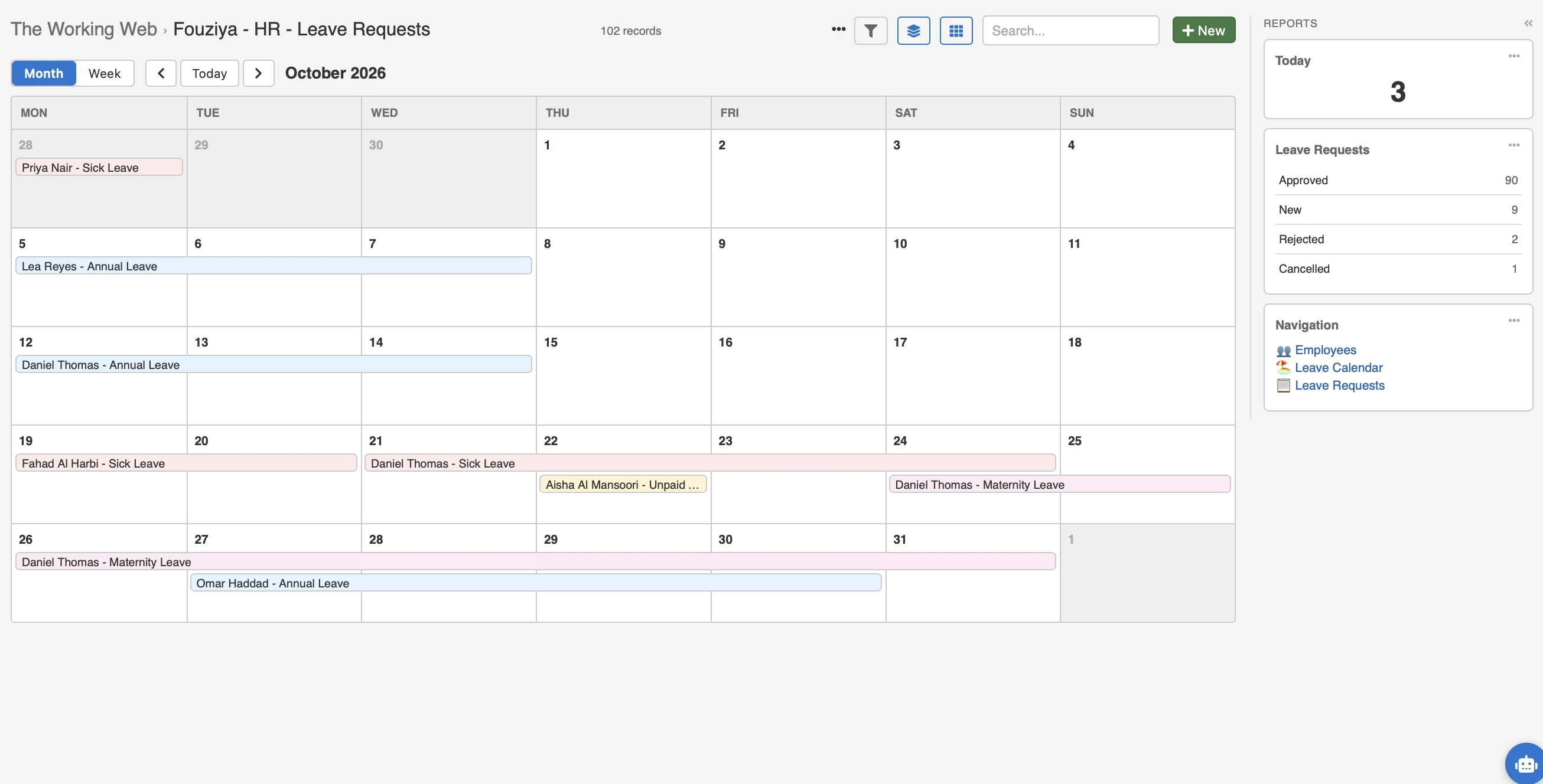
Instead of checking multiple spreadsheets or asking HR who is away, managers can review the team leave calendar.
See scheduled absences and requested dates together, making it easier to identify potential conflicts before approving additional leave.
Especially useful when:
- Multiple employees request time off during Eid or school holidays.
- A small department needs minimum staffing.
- Employees from the same team request overlapping dates.
- Managers need to plan around upcoming absences.
Make leave decisions with visibility, not guesswork.
3. Give Every Leave Request a Clear Approval Process
A leave request shouldn’t be considered approved just because someone mentioned it in a conversation.
Set up a structured process:
- Employee submits a request with their leave type and dates.
- Manager receives a notification that a request needs review.
- Manager checks the calendar for overlapping leave and staffing availability.
- Manager approves or rejects the request.
- Employee receives an update about the decision.
- HR can review the request status and associated records.
No more verbal approvals, unanswered messages or confusion about whether leave was authorised.
Every request has a status. Every decision has a record.
4. Automated Alerts That Keep Everyone Informed
Stop being the person who has to remind everyone.
Your leave management process can automatically notify the right people when something needs their attention.
- New request alerts: Inform managers when employees submit leave requests.
- Pending approval reminders: Follow up on requests waiting for a decision.
- Approval notifications: Let employees know when leave is approved or rejected.
- Upcoming leave reminders: Inform relevant people before scheduled absences.
- Overlapping leave alerts: Flag potential scheduling conflicts for review.
- HR updates: Keep HR informed as requests move through the approval process.
Configure notifications around your organisation’s workflow so requests don’t depend on someone remembering to send a message.
Less chasing. Faster decisions. Fewer surprises.
5. See Who’s Away With a Shared Leave Calendar
Need to know who’s taking leave next week?
Open the calendar instead of checking individual employee records or asking around.
Review leave dates and request statuses in one view.
Help managers plan workloads, arrange coverage and make informed decisions before approving more time off.
A clearer picture of team availability, without maintaining another spreadsheet.
6. Keep Annual, Sick, Maternity and Other Leave Organised
Different types of leave need different records.
Keep employee leave information organised by:
- Employee
- Leave type
- Start and end dates
- Request status
- Leave history
Review annual leave, sick leave, maternity leave and other recorded absences without searching through separate files.
7. Keep Leave Records Connected to Employee Information
Leave management works better when it isn’t isolated from the rest of HR.
Keep requests linked to employee records so HR can review leave alongside the employee information already maintained in the system.
One connected HR workspace instead of scattered files and disconnected trackers.
Explore employee management as part of your connected HR workspace.
Built for the Realities of Managing HR in the UAE
Managing employee leave in the UAE involves more than recording holiday dates.
Different Leave Entitlements
Employees may have different joining dates, service periods, leave categories and applicable policies. Maintain organised records that help HR review requests and entitlements.
Eid, Public Holidays and Busy Seasons
Several employees may request the same dates off. Use calendar visibility and approval processes to help prevent avoidable staffing shortages.
Sick Leave and Maternity Leave
Keep different leave categories clearly recorded, making it easier to review employee absence history.
Multiple Departments and Locations
As teams grow, informal leave approvals become harder to manage. A structured system helps businesses maintain a consistent process across departments and managers.
HR Records and Payroll Administration
Leave information is relevant to payroll and employee administration. Keeping records organised and accessible helps reduce the manual effort of collecting information when payroll is prepared.
Leave policies, statutory entitlement calculations and payroll treatment must be configured and verified against the applicable UAE requirements. The system does not replace legal or HR compliance advice.
From Manual Leave Tracking to an Organised Process
| Without a leave management system | With HR & Payroll App |
|---|---|
| Requests scattered across WhatsApp and email | Employees submit requests in one place |
| Managers unaware of overlapping holidays | Review dates together on a leave calendar |
| HR chasing managers for decisions | Approval workflows and reminders |
| Employees asking whether leave is approved | Recorded statuses and notifications |
| Manually informing everyone about absences | Automated updates and upcoming leave alerts |
| Multiple Excel trackers | Centralised employee leave records |
| Searching messages for past approvals | Request and decision history |
| Last-minute staffing surprises | Better visibility before approving leave |
A Leave Management System That Fits Your Business
Not every company has the same approval process.
Some businesses have one HR administrator. Others have department managers responsible for approving employee leave.
We’ll review how your organisation currently handles requests, approvals, notifications and leave records, then confirm how the system can support that process.
No need to change the way your entire business operates just to organise employee leave.
See Your Leave Management Process in Action
Book a free demo and see how HR & Payroll App can help your business manage leave requests more efficiently.
We’ll walk you through:
- Employee leave requests
- Team calendar and overlapping dates
- Manager approval workflows
- Automated notifications and reminders
- Leave types and employee records
- Leave balances and policy requirements
- How the system connects with your wider HR administration
Already managing leave in Excel? Bring your spreadsheet to the demo.
We’ll show you how your existing process could be organised in the system.
Book a Free Demo View pricingFrequently Asked Questions
Your leave questions.
Clear answers.
What is leave management software?
Leave management software helps businesses manage employee leave requests, approval processes, leave dates, records and team availability in one system instead of relying on spreadsheets and messages.
Can employees submit leave requests themselves?
Yes. Employees can submit leave requests through the system, subject to the employee access included in your plan.
Can managers see overlapping leave before approving?
The leave calendar displays requested and recorded leave dates, helping managers review potential overlaps before making approval decisions.
Does the software support leave approval workflows?
Approval workflows can be configured according to the supported system capabilities and your organisation’s requirements. We’ll demonstrate and confirm the available approval process during setup.
Can the system automatically notify managers about leave requests?
Automated notifications can be incorporated into the leave workflow, subject to configuration and the supported notification channels. This can include new request alerts, approval updates and reminders.
Can HR receive alerts when employees request overlapping dates?
Overlap alerts can be included where the necessary conflict-checking automation is configured. The calendar also provides a visual way to review overlapping dates.
Can we manage annual leave, sick leave and maternity leave?
Yes. The system supports recording different leave types against employee records.
Does it automatically calculate UAE annual leave balances?
Leave entitlement and balance calculations depend on the employee’s circumstances and applicable policies. We’ll review your requirements and confirm the available calculation and configuration options during the demo.
Can we use the system for multiple departments?
Employee leave records can be organised across your workforce. Department-level visibility, access permissions and approval routing can be reviewed during setup.
Is this suitable for small UAE businesses?
Yes. HR & Payroll App is intended for businesses that want a more organised approach to employee and leave administration without depending entirely on manual trackers.
Can we see the software before buying?
Yes. Book a free demo to see the system, review your requirements and understand the available features and setup options.
Stop Chasing Leave Requests.
Start Managing Them.
Your HR team has better things to do than search WhatsApp messages, remind managers and update spreadsheets.
Give employees a clear request process, managers visibility before approving leave, and HR an organised system with automated updates.
Make leave management one less thing to worry about.